
Complete the shared settings first
Every tool needs the Windows settings and the General Settings before this guide.
Salmon-Trout setup
Before starting
- Follow the Windows settings and complete the General Settings.
- Start near the fishing spots at Barbarian Village.
- Keep a fly fishing rod and enough feathers in your inventory.
- Enable Shift-click dropping and leave room for catches.
- Keep the inventory tab open.
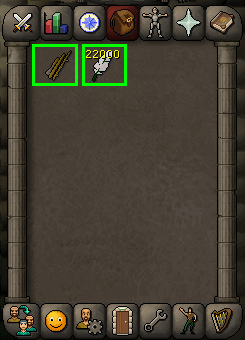 (opens in a new tab)
Fishing settings
| Setting | Required value |
|---|---|
| Fishing spot indicators | On |
| Fishing spot indicators: tools only | On |
| Fishing spot indicators: mouse over tooltip | Off |
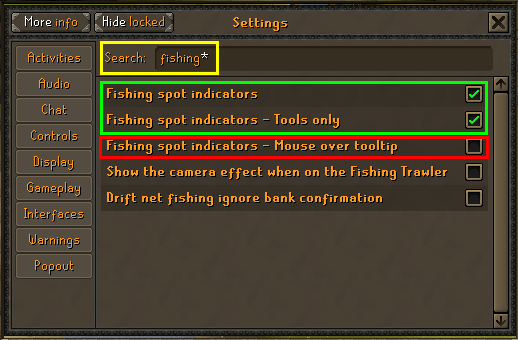 (opens in a new tab)
Dropping catches
Turn Shift click to drop items on so the tool can drop recognized raw salmon and raw trout. Other unrecognized items still occupy inventory space and are not automatically dropped.
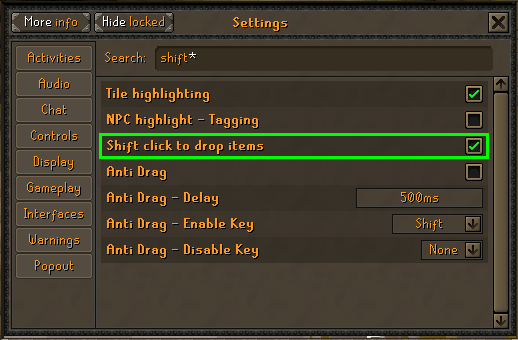 (opens in a new tab)
Starting location
Start near the Barbarian Village fishing spots, beside the river. Use the minimap below as a location reference; the player is at the centre of the minimap.
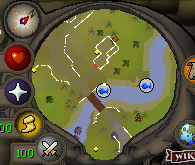 (opens in a new tab)
Ready to try Salmon-Trout?
Start free trial